AssetAsyst User Manual

AssetAsyst User Manual

  • Home

›Overview and Installation

AssetAsyst

  • Home
  • Database Config

Overview and Installation

  • Asset Type Overview
  • Asset Info Form
  • Install and Registration

Configuration

  • Login
  • User Setup
  • Map Customisation
  • Defect Type Prioritisation
  • Attachment Setup
  • Inspection Setup
  • Methodologies
  • Code Tables
  • Custom Fields
  • Asset Risk Score

Operational Guide

  • Main Screen Windows
  • Assets
  • Inspections
  • Defects
  • Work Orders
  • Advanced Work Orders
  • Predictive Modelling
  • Custom Assets
  • Mapping - Locate Asset/Defect
  • Heavy Vehicle Route Assessment
  • Filtering
  • Reporting

Finance / Capital

  • Accessing Capital Editor
  • Depreciation and Finance Module

Mobile Guide

  • Mobile Guide
  • Mobile App

Asset Info Form

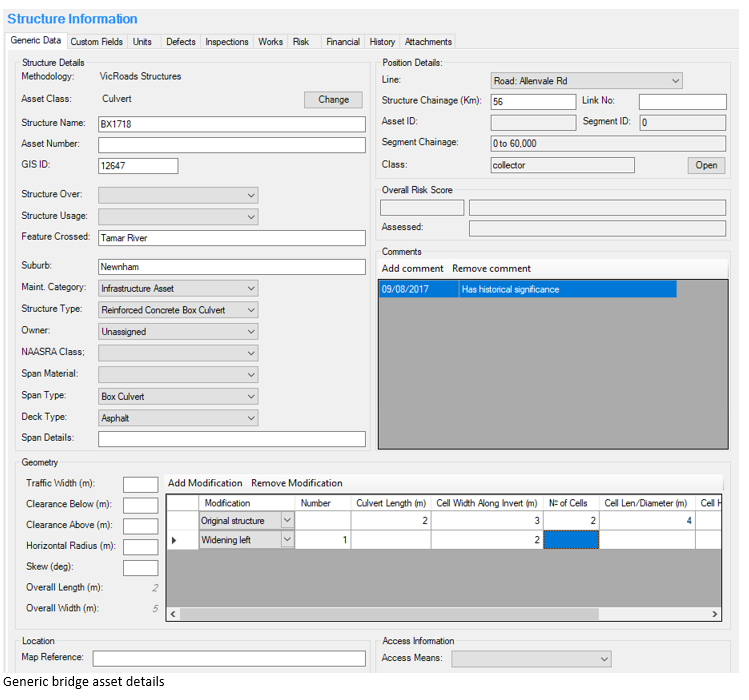
The asset details stored for bridge structures in AssetAsyst® relate to the generic information for the bridge structure, such as name, ID number, span type and materials, bridge geometry and location. Generic bridge asset details
Custom Assets

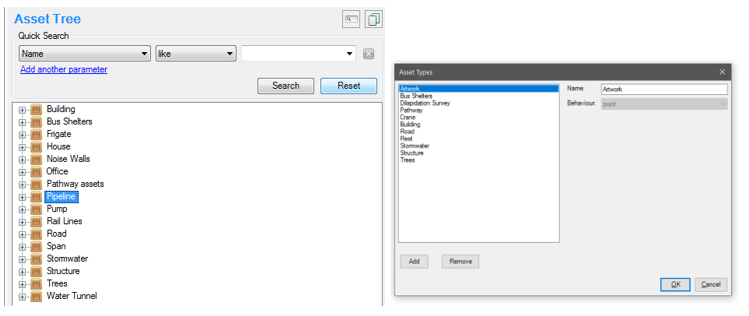
Using the AssetAsyst® custom assets module, you can define any asset type that you can imagine. To define your own custom asset types, click the “Tools” menu and select “Asset Types”. Custom Assets
← Asset Type OverviewInstall and Registration →
AssetAsyst User Manual
Docs
Getting Started (or other categories)ConfigurationOperational GuideMobile Guide
Community
YouTubeTwitter
More
Blog
Copyright © 2004 - 2022 pitt&sherry