AssetAsyst User Manual

AssetAsyst User Manual

  • Home

›Configuration

AssetAsyst

  • Home
  • Database Config

Overview and Installation

  • Asset Type Overview
  • Asset Info Form
  • Install and Registration

Configuration

  • Login
  • User Setup
  • Map Customisation
  • Defect Type Prioritisation
  • Attachment Setup
  • Inspection Setup
  • Methodologies
  • Code Tables
  • Custom Fields
  • Asset Risk Score

Operational Guide

  • Main Screen Windows
  • Assets
  • Inspections
  • Defects
  • Work Orders
  • Advanced Work Orders
  • Predictive Modelling
  • Custom Assets
  • Mapping - Locate Asset/Defect
  • Heavy Vehicle Route Assessment
  • Filtering
  • Reporting

Finance / Capital

  • Accessing Capital Editor
  • Depreciation and Finance Module

Mobile Guide

  • Mobile Guide
  • Mobile App

Defect Type Prioritisation
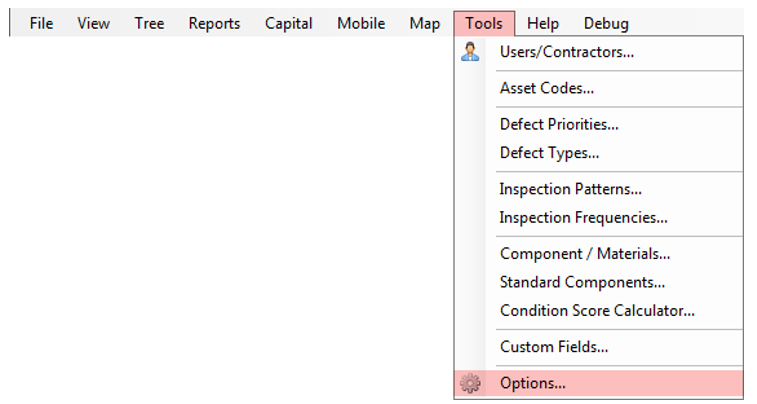
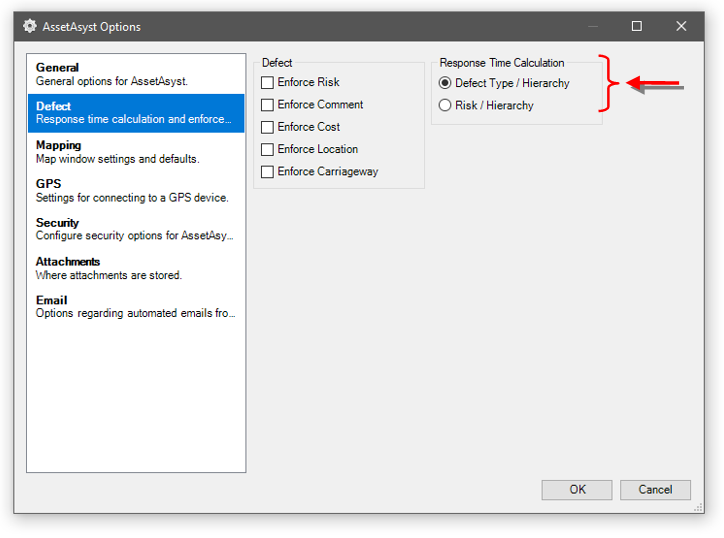
Most users settle for determination of defect rectification period based on the Defect Type recorded and a road maintenance category. Some users use a site Risk assessment approach in order to determine the amount of time a defect should remain unmitigated. The default is to use Defect Type, the option exists to use an alternative method. See Section 3 – 4 Defects for an explanation of how this integrates with the software.
← Map CustomisationAttachment Setup →
AssetAsyst User Manual
Docs
Getting Started (or other categories)ConfigurationOperational GuideMobile Guide
Community
YouTubeTwitter
More
Blog
Copyright © 2004 - 2022 pitt&sherry