
Asset Type Overview
AssetAsyst® deals with a number of different asset types. The power of the software is that you can manage multiple asset types through a common interface, and yet each asset is treated in a specialised and unique way.
Each asset can be sub-divided into sections called units. The meaning of a unit changes between asset types.
Linear Assets
Roads
Roads are linear assets in AssetAsyst®. Any given point along the road can be defined by its chainage (measured in metres). Each unit of a road is a segment, which represents a portion of the road from one chainage to another. Roads can be segmented in any way that the user of the system desires. A segment break might occur because different parts of the road have difference surfaces, or a road might be segmented between intersections.
A road is represented by a line shape in the GIS. Each segment of the road is a separate shape in the GIS layer. It is also possible to represent a road as a polygon, and AssetAsyst® will support this, but you will miss out on some useful features (such as automatically detecting chainage when creating a defect on the GIS). For this reasons, pitt&sherry recommends representing roads as lines.
Roads can be re-segmented simply in AssetAsyst®, but when this is done, the GIS needs to be re-segmented as well to gain the most benefit from the system. pitt&sherry offer a GIS re-segmentation tool for this purpose which can be purchased separately to AssetAsyst®.
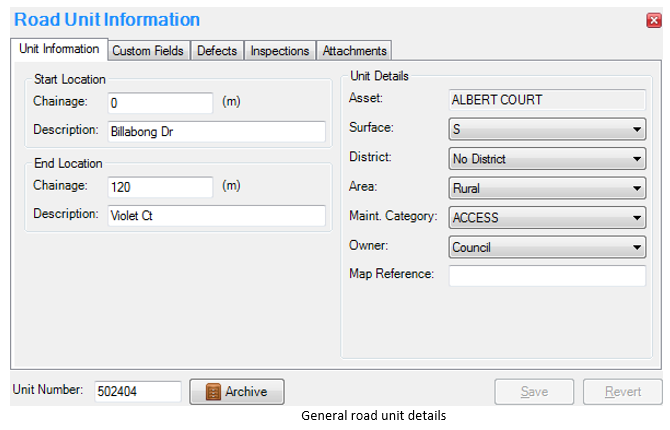
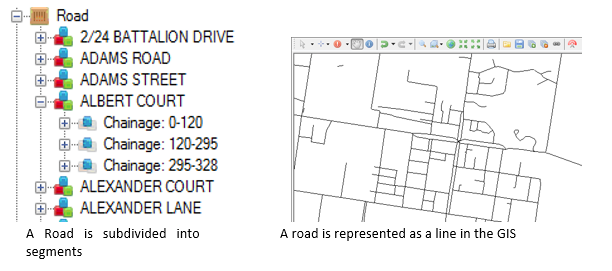 AssetAsyst® stores certain values for each asset type. For road units, details such as begin and end descriptions and chainage, GPS coordinates, road surface, maintenance category and owner.
Pathways
Pathways are also a linear asset and behave similarly in some ways to roads.
Pathways can represent footpaths on the sides of roads, but also bike tracks and other shares paths.
Like roads, the units of pathways are segments defined by start and end chainages. Pathways are less likely to have continuous chainages from one segment to another, as footpaths do not cross over intersections. Pathway assets are represented as line shapes in the GIS.
Custom Linear Assets
You can define your own linear asset types in AssetAsyst®.
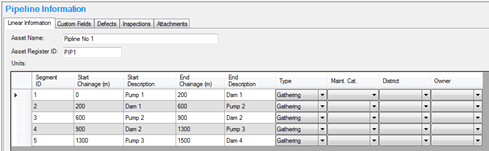 To define a new linear asset type, click the “Tools” menu and select “Asset Types”. Examples of custom linear asset types you might want to define include railway lines and sewer pipes.
Polygon Assets
Building Assets
Buildings are different from linear assets in many ways, and are treated as such in AssetAsyst®.
The units of a building commonly represent different floor, or subdivisions, but it is also quite acceptable to not subdivide a building asset into units.
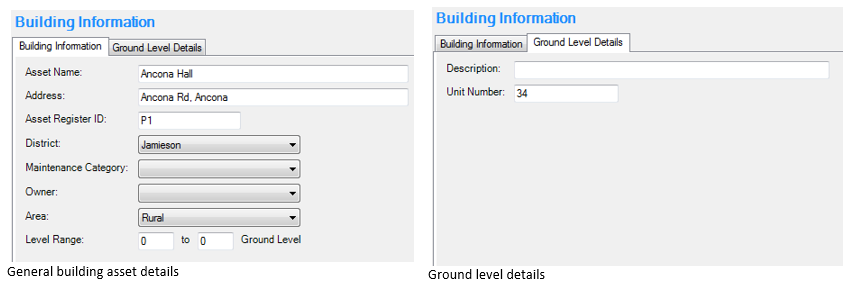
Building assets are represented in the GIS as polygon shapes. The mapping module in AssetAsyst® allows a GIS layer to be assigned to a floor level so that the different floors of the building can be represented in GIS.

The asset and units details stored for a building in AssetAsyst® are quite different than those stored for a linear asset such as a road or pathway.
Point Assets
Structure Assets (Bridges)
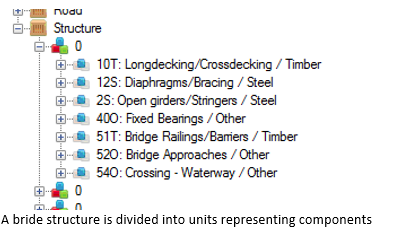
Bridges and culverts are classed as structure assets. Like buildings, they store most data at the asset level and the units aren’t defined by start and end chainages. Unlike buildings, the units of a bridge in AssetAsyst® refer to the different components on the bridge structure.
In the GIS layer, bridge assets can be represented in any geometry type: point, line or polygon.