
AssetAsyst User Manual
Compatible with AssetAsyst® v1.43.0 - October 2019
Modules
- Road Assets
- Pathway Assets
- Building Assets
- Bridge Assets
- Custom Assets
- Inspections Activity Management
- Works Management
- Capital Inventory Management
- Condition Assessment
- Financials
- Predictive Modelling
- Heavy Vehicle Route Analysis
© 2004-2019 pitt&sherry
Information in this document is subject to change without notice. Organisations, names, and data used in examples herein are fictitious unless otherwise noted. You can use this document for information purposes and cannot show it to others or make copies without written permission from pitt&sherry.
Getting Started
This section of the User Guide is designed to assist in all system and data configuration as well as general setup of the software. Most of the instructions and advice provided in this section will need only be referred to during the initial configuration phase.
About pitt&sherry
pitt&sherry is a leading multi-specialist infrastructure consultancy that has been delivering intelligent and sustainable solutions to industry, government and communities for over 50 years.
With a relentless client focus that adds value to businesses, governments and communities, we service a range of markets including transport, industrial, mining, energy, food & beverage, and community infrastructure.
pitt&sherry has been built on a strong foundation of working with integrity and a commitment to sustainable development and environmentally responsible engineering practices.
Our deep knowledge and understanding allow us to help our clients achieve their goals.
pitt&sherry has developed a range of specialised infrastructure management software products including AssetAsyst® and ClimateAsyst®. The Software AssetAsyst® is an asset inventory, maintenance and inspection management system developed by pitt&sherry to better manage all types of infrastructure, including roads, pathways, buildings, bridges, and custom asset types. AssetAsyst® includes a road asset module (RoadAsyst®), an embedded map interface window (Mapping Module), a pathway asset module (PathAsyst), a building management module (BuildingAsyst), a bridge management module (BridgeAsyst®), a heavy vehicle route analysis module, and a custom assets module.
RoadAsyst®, PathAsyst, BuildingAsyst, BridgeAsyst® and Capital Editor can all be used independent of each other. The Mapping module adds additional functionality to any existing module.
AssetAsyst® is a software tool designed for asset owners and maintainers to:
- Store and edit asset inventory information
- Schedule maintenance and risk oriented inspections
- Record faults using a map interface
- Visualise asset and activities using a fully integrated map interface
- Seamlessly transfer inspection information from field devices
- Easily identify and assign fault rectification works
- Ensure a fully transparent record of activities is maintained
- Assist decision making by combining capital and maintenance information
- Comply with the Victorian Road Management Act
The Modules
RoadAsyst®, PathAsyst, BuildingAsyst and BridgeAsyst® are products developed specifically for managing the inspection and maintenance of defects to minimise the asset owners liability with respect to potential accidents caused by those defects. It can be used to plan pro-active regular inspection and maintenance regimes or to record, inspect and manage individual defects as they are found and reported. The program incorporates risk-based prioritisation of defects for attention. The enhanced reporting functions provide managers with a number of compliance reporting formats that will help to prioritise works better and report to corporate decision makers.
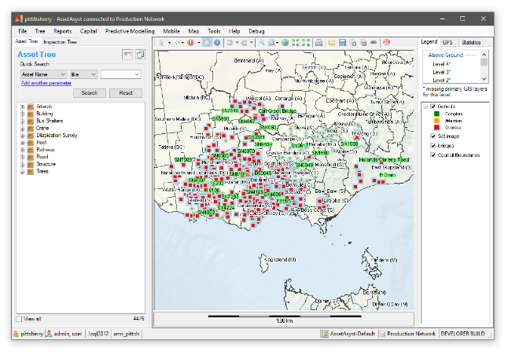
The Integrated Map provides a further critical tool for managers to plan and make decisions for all types of activities. The map can be made accessible to all users in both office and field locations and provides an easy way to navigate and operate AssetAsyst®.
The Custom Assets module allows you to define your own custom asset types. These asset types can have a variety of behaviours and methodologies.
The Mobile App allows inspections to be carried out on mobile phones and tablets.
The Predictive Modelling module provides a means to predict the future condition, financial value, and ultimately life expectancy of assets.
The Heavy Vehicle Route Assessment module automates the testing of heavy vehicles over bridges.
Definitions
AssetAsyst® –is the name used to describe the overall software application for integrated asset maintenance and inspection management system.
RoadAsyst® –is a module of AssetAsyst®. Its functions are to store a road register, inspections and maintenance management information.
BridgeAsyst® – is a module of AssetAsyst® that is used to store the bridge, culvert and other componentised structural information in a register, inspections and maintenance management information.
Road Maintenance Category – Can be the road hierarchy, but is often a combination of the hierarchy, traffic volumes, speed zones, maintenance zones etc.
Defect – Refers to any fault regardless of it being categorised as ‘above’ or ‘below’ a documented ‘intervention level’ as per the description in a road management plan.
Intervention Level – These are usually defined in an asset management plan to be the state, condition or level of risk that is deemed unacceptable and require remedial action within a prescribed timeframe.
Contact Details
For assistance, please contact:
Gavin Chadbourn
- Product Manager
- gchadbourn@pittsh.com.au
- 1300 PITTSH
pitt&sherry IT Helpdesk
- Helpdesk support for the AssetAsyst® product.
- it@pittsh.com.au
- (03) 6323 1956
Accessing AssetAsyst
If you are a cloud customer, you can access AssetAsyst using the URL and login details provided. If you are a local install customer, you can download the latest version of the software from http://it.pittsh.com.au/downloadcentre/ and click AssetAsyst®.